

TL;DR
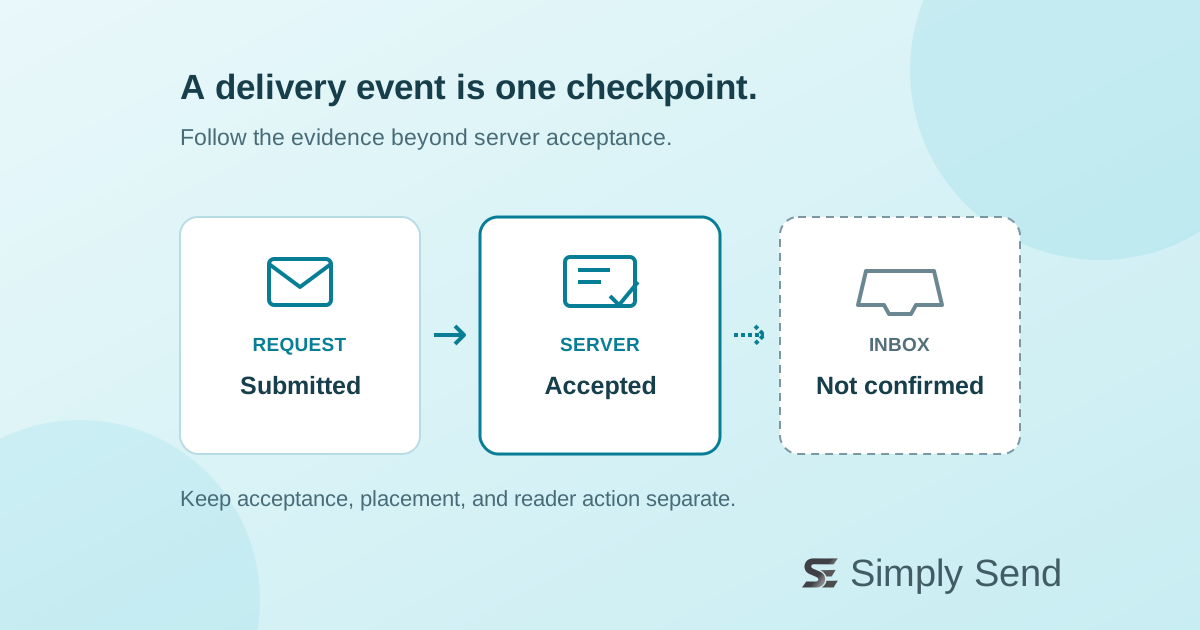
A delivery event usually confirms that a receiving mail server accepted your message. It does not prove inbox placement or that a person read it. Before resending, collect the message ID, recipient, timestamp, and server response; check later events and recipient-side filtering. Investigate one affected message first, then compare patterns by mailbox provider. Keep acceptance, inbox placement, and useful customer actions separate in your reporting.
What “delivered” actually means
Email passes through several systems before a reader sees it. Your application submits a request to a sending service; that service then transfers the message using SMTP, the protocol mail servers use to exchange email. An API success response and a recipient-server acceptance are different checkpoints.
RFC 5321 describes a successful SMTP response after the message data as a transfer of responsibility to the receiving server. That server may be an organization’s gateway rather than the user’s final mailbox. The response is not a report about which folder the message ultimately occupies.
For a concrete provider example, Amazon SES delivery notifications include the recipient, timestamp, and the remote server’s SMTP response. AWS also documents that a delivery notification can be followed by a separate bounce. Read your provider’s event definitions rather than assuming every “delivered” label has identical semantics.
Separate acceptance from attention
After acceptance, receiving systems can apply spam filters, quarantine policies, forwarding rules, and mailbox rules. A message may be accepted without appearing where the recipient expects it. Authentication matters, but passing authentication is not a promise of inbox placement.
Gmail publishes both sender requirements and recommendations. Check the rules that apply to your sending volume and message type. Treat compliance as a foundation for investigation, not proof that a particular recipient saw a particular email.
Likewise, an open or click event is an observation, not proof that the intended person completed a task. AWS event documentation includes indicators for likely automated engagement. Track the useful outcome separately: for example, a completed password reset rather than an image request.
Investigate one message before resending
Start with a single affected message and build a small evidence trail. Record its provider message ID, recipient, send time, acceptance time, and SMTP response. Use ISO timestamps with a time-zone offset or UTC so different logs can be compared. Avoid copying private message contents into support logs.
Next, check for later bounces or delays and confirm you are inspecting the same recipient and send attempt. Ask the recipient to check spam, quarantine, forwarding, and mailbox rules. For a business mailbox, their administrator may need to inspect the receiving gateway.
Finally, compare affected messages by mailbox provider, time window, and recent configuration changes. A pattern can guide the next test; it does not establish a cause by itself. Do not repeatedly resend simply because someone cannot find an accepted message. First identify which checkpoint lacks evidence, then choose a targeted follow-up.